With effect from 15th June 2018, 500px.com has shut down its API. So none of the instructions and examples below is working. This page is, however, being kept for historical reasons.
Obtaining an API Key (🔗)
Photos from 500px can be included in your posts using Photonic. This requires you to obtain an API key, which can be obtained thus:
- Start by visiting the link to request a Consumer API Key. Therein click on the link to “Register your application”:

API Key Request - Most fields in the resultant are not essential, however you will at least need to provide the name and the description:
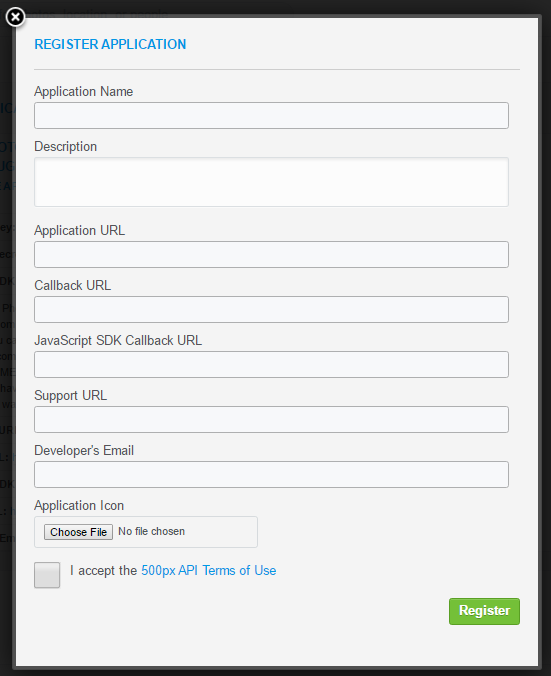
Fill out some details and register - The API key might not necessarily be approved immediately. Until it is approved you cannot use it to retrieve photos. You can check the status of your API key by looking at your registered application details in the 500px admin screens.
Once you have your API key and secret, set them in the options under Settings → Photonic → 500px → 500px settings.
500px was at one time the most fickle with their API amongst all the providers that Photonic supports. I have had them change the format of their URLs, completely trash existing APIs etc., without ever notifying the developers of such changes. Since mid 2015 things have been a lot better, though. If you do happen to find something broken, please notify me immediately, and I will work to fix the issue ASAP.
Basic Syntax (🔗)
The following is the basic syntax:
[gallery type='500px' feature='xyz']The parameter values for feature are described on the API documentation page:
popular– Returns “popular” photosupcoming– Returns “upcoming” photoseditors– Returns “Editor’s choice” photosfresh_today– Returns photos that are “Fresh Today”fresh_yesterday– Returns photos that were “Fresh Yesterday”fresh_week– Returns photos that are “Fresh this week”user– Returns photos for a specified user. Needs either theuser_idor theusernameattribute specified.user_friends– Returns photos by users whom the specified user is following. Needs either theuser_idor theusernameattribute specified.user_favorites– Returns photos that are the specified user’s favourites. Needs either theuser_idor theusernameattribute specified.
Getting Photos for a User (🔗)
To get photos from a particular user, use the feature switch feature='user':
[gallery type='500px' feature='user' username='abc' rpp=20]The rpp parameter can control how many photos you want to display in the gallery. The maximum is 100 and the default is 20. If you use a number higher than 100 the default of 20 photos are returned.
Generic Photos from 500px (🔗)
You can get photos not specific to a user by using any of the feature switches from the above that don’t have user in them. This can help you find photos that are popular, editors’ choices, upcoming etc. The following gets popular photos from only a specific category:
[gallery type='500px' feature='popular' only='Animals']Additionally you can alter the sizes to be returned using the thumb_size and the main_size parameters. The complete list of image sizes can be found in the 500px documentation.
The following demonstrates a size 2 (140 × 140 px) thumbnail with a size 3 (280 × 280 px) popup, with 9 Editors’ Choice Black and White photos:
[gallery type='500px' feature='editors' only='Black and White' rpp=9 thumb_size='2' main_size='3']Tags and Searches (🔗)
What if you wanted to search for specific photos in 500px.com? For this you may drop the feature parameter. You could use the tag parameter to get photos with a specific tag. Note that the tag parameter doesn’t work with other parameters such as feature or sort. This is a limitation of the 500px.com API. The following 12 photos are tagged “Iceland” and are being displayed with size 2 (140 × 140 px) thumbnails:
[gallery type='500px' tag='Iceland' rpp=12 thumb_size='2']You could also search for photos with a specific search term using the term parameter. Like tag, this too doesn’t work with other parameters such as feature or sort. The following photos are the results of searching for “Hyderabad”:
[gallery type='500px' term='Hyderabad']Single Photos (🔗)
Photonic also lets you display a single photo from 500px.com:
[gallery type='500px' view='photos' view_id='abc']Galleries / Collections / Sets (🔗)
Galleries (formerly Collections, Sets) are supported in 500px.com, both via using their names and their ids. This needs authentication, and can be invoked thus:
[gallery type='500px' view='collections' view_id='abc']In the above, ‘abc’ is the collection id. To get the id, open the link of any photo in a collection. The URL will have the structure http://500px.com/photo/7206122?from=set/265673. Pick the portion after from=set/, which in this case is 265673. This way to fetch the collection id is convoluted, yet required if you are not passing user information:
[gallery type='500px' view='collections' view_id='19669029']Life is a lot easier if you do pass the user information, in which case you can use named galleries by passing the easily-readable username:
[gallery type='500px' view='collections' username='abc' view_id='portfolio' layout='circle' thumb_size='2']If you drop the view_id parameter, Photonic can fetch all collections for a user, provided the user is given. Both, user_id and username are accepted:
[gallery type='500px' view='collections' username='sayontan' layout='random']Filters (🔗)
What if you had multiple galleries and only wanted to show some of them? You can use the filter attribute for this purpose. You can pass a comma-separated list of gallery names for the filter, saying filter='abc,xyz':
[gallery type='500px' view='collections' username='sayontan' layout='random' filter='Bushveld']What if you wanted to exclude every album but “Bushveld” from my results? You can use the filter_type='exclude' for this purpose:
[gallery type='500px' view='collections' username='sayontan' layout='random' filter='Bushveld' filter_type='exclude']By default filter_type assumes a value include.
Lastly you can use the columns parameter to display a certain number of photos per row, just like regular galleries.
“Show More” and Paged Results (#)
If a search result has a lot of photos and you want to reduce the count, Photonic offers a couple of approaches:
- For 500px, use the
rppattribute documented above, and add an additional tag,more. This will initially show you the number of photos specified inrpp, and a button to load more images. Upon clicking the button you will see an additional set of photos as limited byrpp. The button will continue to show until you have exhausted the entire set of photos. - Photonic can be used in conjunction with
<!-- nextpage -->to display photos in a paged manner. For this you can structure your page content thus in the WP Editor:Lorem ipsum dolor sit amet, consectetur adipiscing elit. Nunc porta enim vel tellus dignissim, a venenatis neque congue. Nunc ornare cursus leo ac viverra. Pellentesque suscipit pulvinar metus, non aliquam odio egestas quis. Vestibulum porta viverra magna, vel malesuada ante fermentum vitae. [gallery type='500px' feature='user' username='valkrider' rpp=20 page=1] <!-- nextpage --> [gallery type='500px' feature='user' username='valkrider' rpp=20 page=2] <!-- nextpage --> [gallery type='500px' feature='user' username='valkrider' rpp=20 page=3]
Here is an example using the first approach. The text you provide to the more parameter controls what is shown in the button:
[gallery type='500px' feature='user' username='valkrider' rpp=20 page=1 layout='circle' more='More']