Design

Before I begin about this release, I would first like to apologize to all people whose layouts broke due to the last release. As it turns out I had not tested certain configurations involving the static Tabbed Sidebar, which resulted in all people using this feature having their sites become train-wrecks. Disabling the Tabbed Sidebar would have fixed the issue for all affected people, but there was no way you as a user could have known that.

Anyway, this release is a bug-fix release and there are no new features. Here are the fixes:

  1. Layout bugs
    1. The biggest issue – wonky layouts upon activation of the Tabbed Sidebar – has been fixed. There is one exception – if you are using IE6 (yes, that fossil) and you have the Tabbed Sidebar on and your Tabbed Sidebar is on the left side and you have at least one sidebar on the left site, then your left sidebar will render incorrectly on IE6 (only on IE6). I spent some time trying to figure this out, but gave up because I had to get this release out early and this particular combination has an extremely low probability of occurring. Otherwise I have hopefully resolved all issues on all browsers regarding this mishap.
    2. The Widget Area Below Header was not spanning the full width of the wrapper and was showing a blank space on the side.
    3. The Widget Area Above Footer was overlapping the right sidebar if the sidebar was longer than the content.
    4. The No Sidebars template was showing up with empty space on the side.
    5. In the “Tiles” layout excerpt images were becoming very tiny because the widths were computing incorrectly.
  2. If you had defined more than one WP 3.0 Menu, each menu item was getting repeated multiple times in the navigation bar. This has been fixed too.
  3. There was a bug that was preventing the post footer from appearing in the archive view (front page, category, date archive, tag etc). So if you had Tags or “Posted By” at the bottom of a post, that wasn’t being displayed. This now works.
  4. There was a very old bug where the excerpt title in the “Tiles” layout where the header of excerpts wasn’t reading the alignment setting correctly. Instead it was borrowing the alignment of Magazine excerpts.

One point I would like to highlight – often when you upgrade your theme it apparently breaks your layout, while in truth there is nothing wrong with it. In such cases try out a few very simple things. First and foremost, clean out your browser’s cache and reload your page. Second, if you have a caching plugin make sure that you rebuild its cache, otherwise it will serve content that is not current.

I also thought I should highlight what some known issues are. There are 2, actually, both of which are JavaScript-related:

  1. At some point in the last 3 releases the Google Translator widget stopped working. I have no idea why, since I haven’t changed anything there. If you were looking for this feature to work I encourage you to look for some free plugin to help you there.
  2. At some point in the last few months the Fade / delay effect on the navigation menu stopped working. Again, I have no idea why. Since this is a very low impact issue I didn’t spend an excruciating amount of time trying to resolve this.

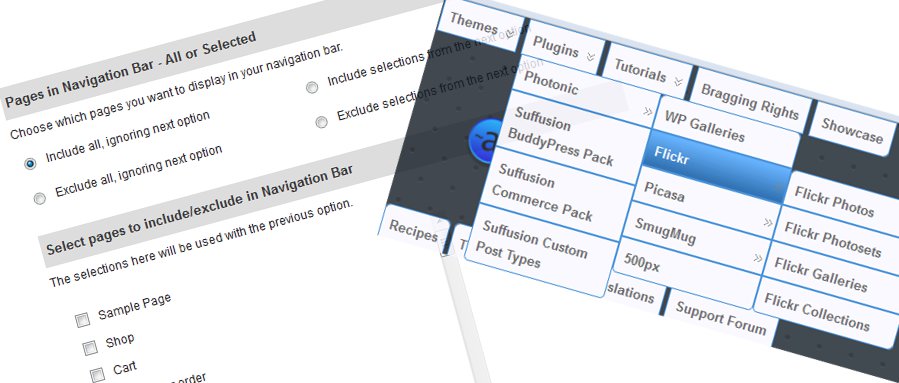
Another aspect I wanted to highlight was regarding my comment in my previous post, about “Rolled up menus”. A few users had difficulty understanding the concept, so I thought I will explain it here. To create a new dummy node:

  1. Go to Appearance → Menus and open up your menu.
  2. Create a new menu item using a Custom Link.
    1. For the URL specify #. Make sure you delete the “http://” that sits there by default
    2. For the Label put in whatever you want to name your root node.
    3. Add to Menu
  3. Once added, move this item to the top of the list.
  4. Now, indent every other item under this top item. This way each other node is a child of your newly created root. Remember to indent – this is important.
  5. That’s it. Since you have set the URL to be “#” Suffusion knows that it shouldn’t open any page for it. All other items are listed as children of this new node.

That’s it for this release. I am hoping this will smooth over the rough edges of 3.6.8. I will keep subsequent releases smaller in scope, though, quite frankly I don’t foresee anything being so large in scope.

Over the next few weeks I will focus on building a proper plugin for Suffusion and BP compatibility, assuming that the support queue for 3.6.9 isn’t huge.


I submitted version 3.5.4 on Sunday, before flying out to the UK. I see that WordPress has still not approved it, so I await the release patiently. This was a big release in terms of the number of fixes and enhancements, so without much ado here is the list:

  1. Optimization
    I did some optimization on multiple fronts:
    1. I introduced a new section under Blog Features called Site Optimization. Most optimization activities have been moved or added there.
    2. I have merged the contents of bgiframe.js with suffusion.js. This is to reduce the overall number of HTTP requests
    3. I have merged the contents of dbx.css with style.css, again, to reduce the overall number of HTTP requests.
    4. You now have options to choose GZip and minification at various levels. Mind you, different plugins can achieve this at various levels for you. In general the capability built into the theme is competent, but not all-encompassing. If you are using a plugin and are happy with it, by all means stick with it. But if you are not using a plugin or don’t want to use one or you don’t have , feel free to give this a shot. From what I have found out this does improve performance on Google Page Speed and on Yahoo YSlow. Feel free to disable the optimization if it doesn’t work well for you:
      1. You can GZip and / or minify the theme’s CSS files from the Blog Features → Site Optimization menu
      2. You can GZip the internal WordPress JavaScript files (like JQuery). Note that these files are already minified, so you don’t have to do anything on that front. Also note that the GZip process doesn’t apply to Suffusion’s JS files (like the JQuery Cycle script for featured content). This is due to a shortcoming in tying together WP’s inbuilt function wp_enqueue_script with the GZip capability. Plugins can still do this for you.
      3. You can also GZip your main content, all from the same Site Optimization section.
  2. WP 3.0 Retro-fixes
    WordPress changed a few things between its last RC version and the final release version. I took care of those in this release:
    1. WP renamed the support type for navigation menus from nav-menus to menus. Because of this the navigation menus seemed to not be working in version 3.5.3 with WP 3.0, while they worked for WP 3.0 RC and Beta versions.
    2. WP also renamed the function is_post_type to post_type_exists. This was causing custom taxonomies to not be associated with custom types in version 3.5.3 (again, this was working for the RC and Beta versions). I have addressed this too.
  3. More WP 3.0 Support
    I have added an option to “flatten” the navigation menus of WP 3.0 in the Navigation menus. Using this setting you will no longer see the menu names in the navigation bar. I have also included WP’s standard code to include feed URLs (this is internal and shouldn’t make a difference to you as a user).
  4. New Widget Areas
    I added two new widget areas: Sidebar 1 (Bottom) and Sidebar 2 (Bottom). These are respectively positioned below Sidebar 1 and Sidebar 2 and will be on the same side as the main sidebars. You can style these sidebars individually, so effectively you can have two sets of tabbed sidebars in the same column.
    As an aside the total number of widget areas in Suffusion is currently 10.
  5. New Action Hooks and Filter Hooks
    A lot of new hooks were added, both as action hooks and filter hooks. You can use these hooks to put in some fancy stuff either through the custom PHP method or through the child theme method. Here are the hooks:
    1. Action Hooks
      These have been added with respect to the sidebars. You can use these to put in some custom markup above your sidebars or between the sidebars or below them.
      1. suffusion_before_first_sidebar
      2. suffusion_between_first_sidebars
      3. suffusion_after_first_sidebar
      4. suffusion_before_second_sidebar
      5. suffusion_between_second_sidebars
      6. suffusion_after_second_sidebar
    2. Filter Hooks
      One filter hook has been added:
      1. suffusion_get_post_title_and_link – You can use this hook to append or prefix the post title with some other text. E.g. You can, as one user requested on the forum, have your own image before the post title, or as another user requested, put in a date in the list layout view. Currently the tile layout doesn’t have this hook, but it will have it in version 3.5.5.
  6. Miscellaneous Changes
    I fixed a small bug brought about by my use of the post_class function. This was causing attachment views to show up unstyled. Now they will get the post class. Another bug I fixed was related to the “Page of Posts” template. For some users this seemed to be ignoring the “Display All Posts” I also made minor modifications to the different layout files by adding global variables that indicate what kind of layout you are using – blog, tile or list. Again, this kind of a change doesn’t impact you, but it is useful if you are going to write your own templates. The last change I made was the addition of an option to disable the use of the body_class internal WP function, because apparently PHP 5.2 has some issues with it. Frankly, this wasn’t my problem to solve, but then again, such things have never prevented users from asking me to resolve their issues.

Now for the next release. I can say for sure about two new features in 3.5.5. One is a couple more widget areas (a lot of people have been asking for widget areas in the header). Another is the use of TimThumb with WP-MS, something that has been in my To-do bucket ever since I released BP support for the theme. As for more features, I need to see what I can fit in my timeline.

While it has been humorously suggested that I am a machine, and while a lot of users on the support forums make demands from me seriously assuming I am a machine I have to remind you what I mentioned at the start of the post: I am in London this week, hence my response times and development speed will be off. Also note that I am not in charge of approvals at WP, so please don’t keep posting questions asking when version 3.5.4 will be available – I have no visibility into that.


I submitted version 3.5.0 of Suffusion a few minutes back for approval. With this release, as promised, I have taken a major step towards supporting WP version 3.0. Here are the key features of this release:

  1. Support for WP 3.0 Menus:
    Initially this was a desperate measure. Some folks testing with WP 3.0 Beta 1 complained that they could not see the list of pages in the navigation bar setup. I did some debugging and found that this wasn’t a fault of the theme, but rather the functionality in the beta release itself was broken. Not knowing when the WP bug would be fixed, I decided to support the menu feature provided in WP 3.0. Of course, by the time I actually started writing the functionality Beta 2 was released and it fixed the original problem. I introduced the support, nonetheless. To use this feature go to Suffusion Theme Options → Blog Features → Main Navigation Bar Setup and Top Navigation Bar Setup and scroll to the section that says WP 3.0 Navigation Menus. This will only work if you have WP 3.0. Before you rush off to install 3.0 be warned that it is still in Beta, so a lot of things will not work as desired.
  2. Native Tabbed Sidebars:
    This was something I had in mind since a really long time, but I had never gotten around to coding it. This is similar to the “Tabbed Sidebar” setup you do in the Blog Features, but with a huge difference: it applies directly to the sidebar!!! In other words, if you go to Suffusion Theme Options → Visual Effects → Sidebars and Widget Areas and set the style of Sidebar 1 to be “Tabbed”, you can add widgets directly to your sidebar and have them show up as tabs. You don’t need to search for short codes to enter in the Custom Tab setup that Suffusion had so far.
    Mind you, there are some caveats – the widgets you add to the sidebar must have a title. Also, they must be “good” widgets following standard coding practices. In other words, the widget authors must take care to use the standard WP tags, $before_widget, $after_widget, $before_title and $after_title while coding their widgets. That means the NextGEN Gallery widget will not work in the tabbed sidebar (Apologies to fans of that plugin, but the widget that comes with it doesn’t follow WP coding guidelines).
    As far as I know Suffusion is the only free theme (and possibly the only theme, free or premium) that offers the capability to have your sidebar show tabs natively. Isn’t that cool? I am going to write up a tutorial on how to do this in a few days.
  3. Bug Fixes:
    I fixed a bug that was causing the title of the magazine section excerpts to show up supersized. Another bug that I fixed was that the JQuery Cycle script was being included twice. Thirdly, there was a minor alignment issue in the comments section, brought around by the relative font-sizing. That is now fixed.
  4. General Changes:
    I have merged the content of plugin.css with the main content. This should reduce one HTTP call from the page. I have also made the fonts for different headers slightly smaller, just to make things appear more pleasant.
  5. New Translation:
    Abe Li has graciously provided a Chinese translation that I have included in this version. Thanks Abe!

I have been delving deeper into WP 3.0 and there are a lot of things I can see that I like:

  1. One big “to-fix” item on my list is full BuddyPress support. In WP 3.0 WP and WP-MU have been integrated, but with one major caveat. Previously you could install WP-MU in a sub-directory on your site, but with the merger, WP cannot be installed in its own directory. This poses a challenge for me, as I have to figure out how to test this setup – I always have WP installed as a sub-directory and I don’t have domains where I could test this.
  2. Another really interesting feature is “Custom Post Types” and “Custom Taxonomies”. The reason I call this interesting is because the themes that will truly benefit from this are full-blown frameworks (like Thematic, Hybrid etc) rather than classical themes like Atahualpa or Suffusion. Of course, Suffusion has enough hooks to have its own child themes, so I have to give this some more thought.
  3. Some rather basic capabilities have been provided like native support for custom headers and custom backgrounds. Since Suffusion already has extensive capabilities in this space, this is not urgent on my priority list.
© 2011 Aquoid Themes Suffusion theme by Sayontan Sinha